Installation
To install Rescope Commerce, just add the Rescope.Commerce package to your website.
The only other Rescope.Commerce packages you may wish to install are:
Rescope.Commerce.PaymentProcessors.*- for payment processors such as Stripe or SquareRescope.Commerce.Shipping.*- for shipping providers
Automatic CMS Setup
The following will be created automatically when you run your website.
- Content Types
- rescopeProduct
- rescopeProductVariant
- Data Types
- RescopePriceEditor
- RescopeShippingMethodPicker
- RescopeTaxRatePicker
- RescopeCustomisationField
- RescopeStorePicker
- List Views
- "List View - rescopeProduct"
Suggested CMS Site Structure
Note
This library scaffholds the essential content types and data types. However, you'll still need to create your own structure and product content to get started.
You use the rescopeProduct content type in your site to define your products, and rescopeProductVariant are nested below rescopeProduct pages to configure variations.
How you structure your site is fully up to you. Here's a suggested site structure:
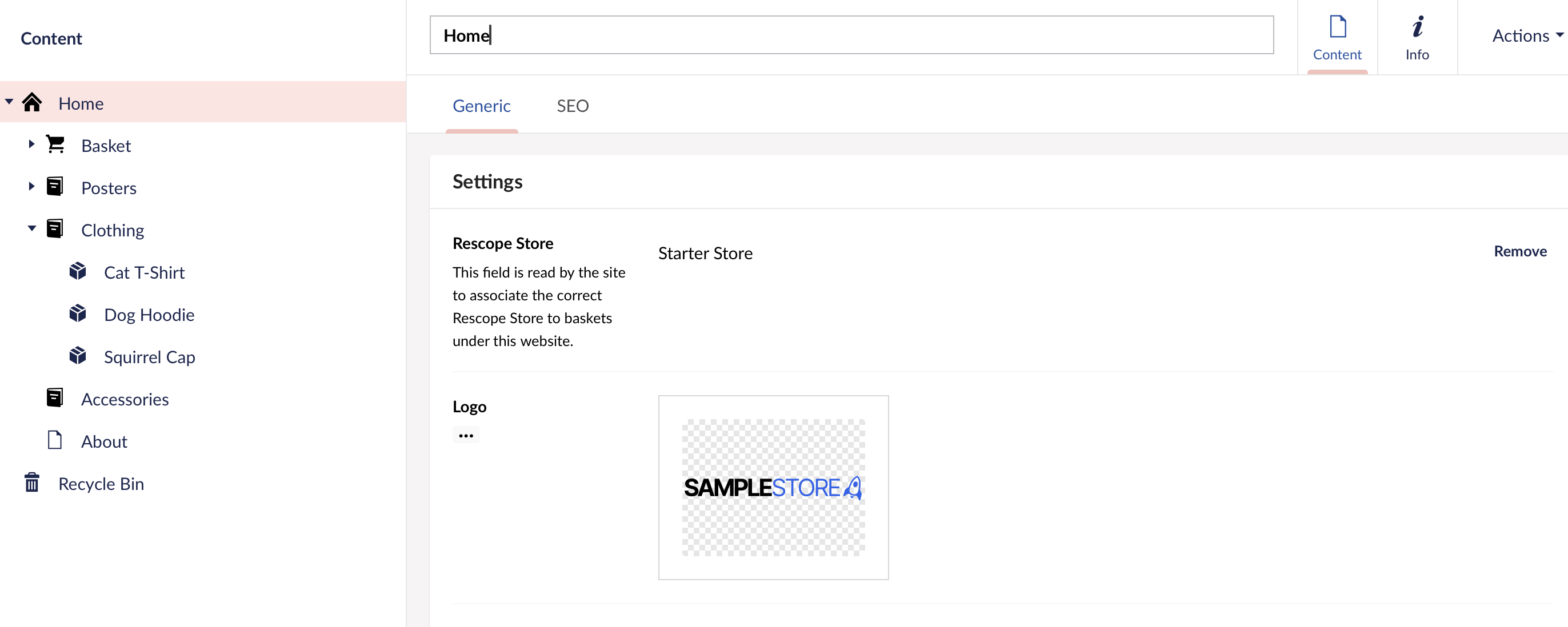
In the above example, home, basket, checkout, confirmation and catalogue are content types not managed by Rescope Commerce, you'd create these yourself.
We also have a 'Rescope Store' property on the home root node, this allows you to specify which Rescope Store should be used by pages under a particular root. This property is not used by Rescope Commerce directly, but instead would be used by your own code when utilising our API.
Take a look at our sample store to the suggested structure in action.
Default appsettings.json section
{
    "Rescope": {
        "Commerce": {
            "DisableScaffholding": false,
            "FrontendApi": {
                "Enabled": false,
                "ApiKey": ""
            }
        }
    }
}
DisableScaffholding
Set this option to true to disable the automatic scaffholding Rescope Commerce applies to Umbraco installations. (data types, default store, etc). Useful if you intend to use uSync to setup new environments.
FrontendApi
FrontendApi.Enabled
When true, the headless frontend API will be accessible
Enabled.ApiKey
When empty, the API will not require authorisation.